
Risk Management
REMEDIATIONDiscovery to Remediation
Fix twelve findings with one patch.
Findings that share one fix are grouped so they are worked once. Sprint boards show what is scheduled next. Remediation lanes track a fix from assignment to scanner verified closure, and the work can go out as a Jira ticket with one click.
Sprint 1
CVE-2025-31324
ARL 1 * 3 sys
CVE-2024-21762
ARL 2 * 2 sys
CVE-2025-24813
ARL 2 * 2 sys
Sprint 2
CVE-2025-22457
ARL 3 * 1 sys
CVE-2024-3400
ARL 4 * 1 sys
Backlog
412 findings
ranked
Grouped fix
SEC-1042 created in JiraUpdate OpenSSL to 3.0.16
12 findings on 5 assets
Illustrative board. Values invented.
From ranked list to verified fix
Group, schedule, assign, verify
01
Group by fix
Open findings that carry the same fix are clustered together, biggest impact first, with no model involved. One patch, one card, every finding it resolves listed under it.
Grouped fixes
02
Schedule
AREA's sprint plan puts findings on a board in the order they will be worked. Open one at a time in a focus view instead of filtering a table.
Sprint board
03
Assign and send
Send a finding, a selection or a whole grouped fix to remediation, one workflow per asset. Lanes are read from the BPMN diagram: whoever sent it and whoever fixes it, resolved from your directory. Tick the box and a Jira ticket goes with it.
Remediation workflow
04
Verify
Two bars, not one. Patches Applied is what the remediator says. Scanner Verified is what the next scan proves, and only that bar turns green.
Verified closure
Integrate, do not replace
The work leaves through your tools
Jira
Opt in per send. A sprint, a group or a single finding becomes a ticket in your project, with the findings it covers.
CSV export
Any sprint or grouped fix as a file, for the teams that live in spreadsheets.
Your directory
Lane owners and notification addresses resolved from Active Directory, so assignments land with real people.
Microsoft Intune
Hand a grouped fix to endpoint management directly.
Seen in the app
The real thing, on synthetic data
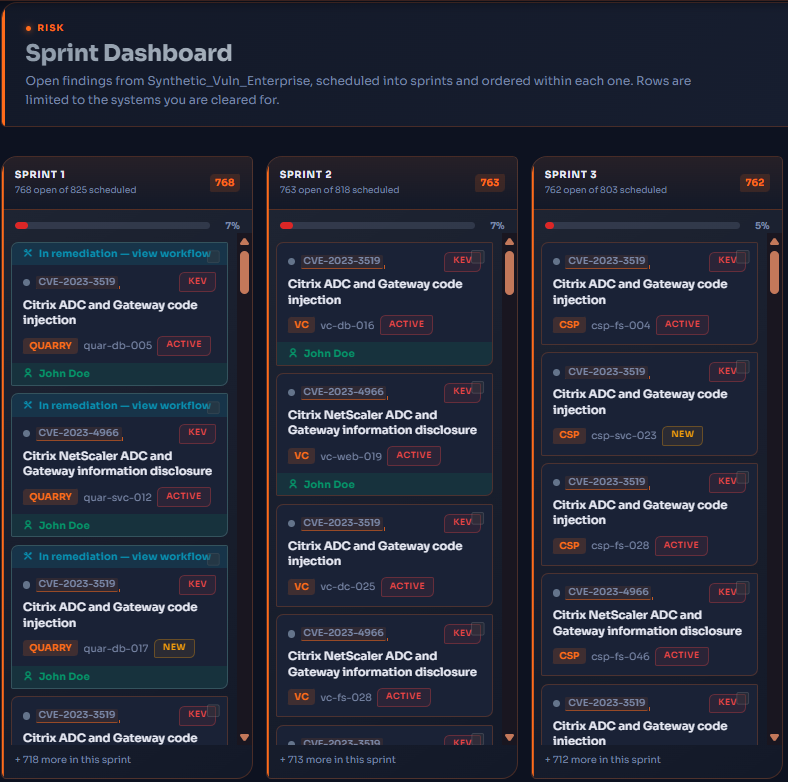
The sprint board, on a synthetic estate
On every card
- The CVE, and whether CISA lists it as exploited
- The system chip and the asset it was found on
- Scanner status, active or new
- The remediator, once it has been sent
On every lane
- Open findings against the number scheduled
- How far the sprint has moved
- One card at a time in the focus view
The board shows only the systems the signed in seat is cleared for, and every name on it comes from the seeded synthetic roster.
What you can do
See what is scheduled next without filtering a table
Open one finding at a time for its full detail
Find a single action that resolves several findings together
Send a finding, a selection or a whole grouped fix to remediation, and to Jira
Track patches applied against patches the scanner has verified, per asset
Straight answers
Watch one patch close twelve findings.
Ask for a demo and see a grouped fix scheduled, assigned, ticketed and verified on synthetic data.